Classify · Grades 6-9
AI Sketchpad
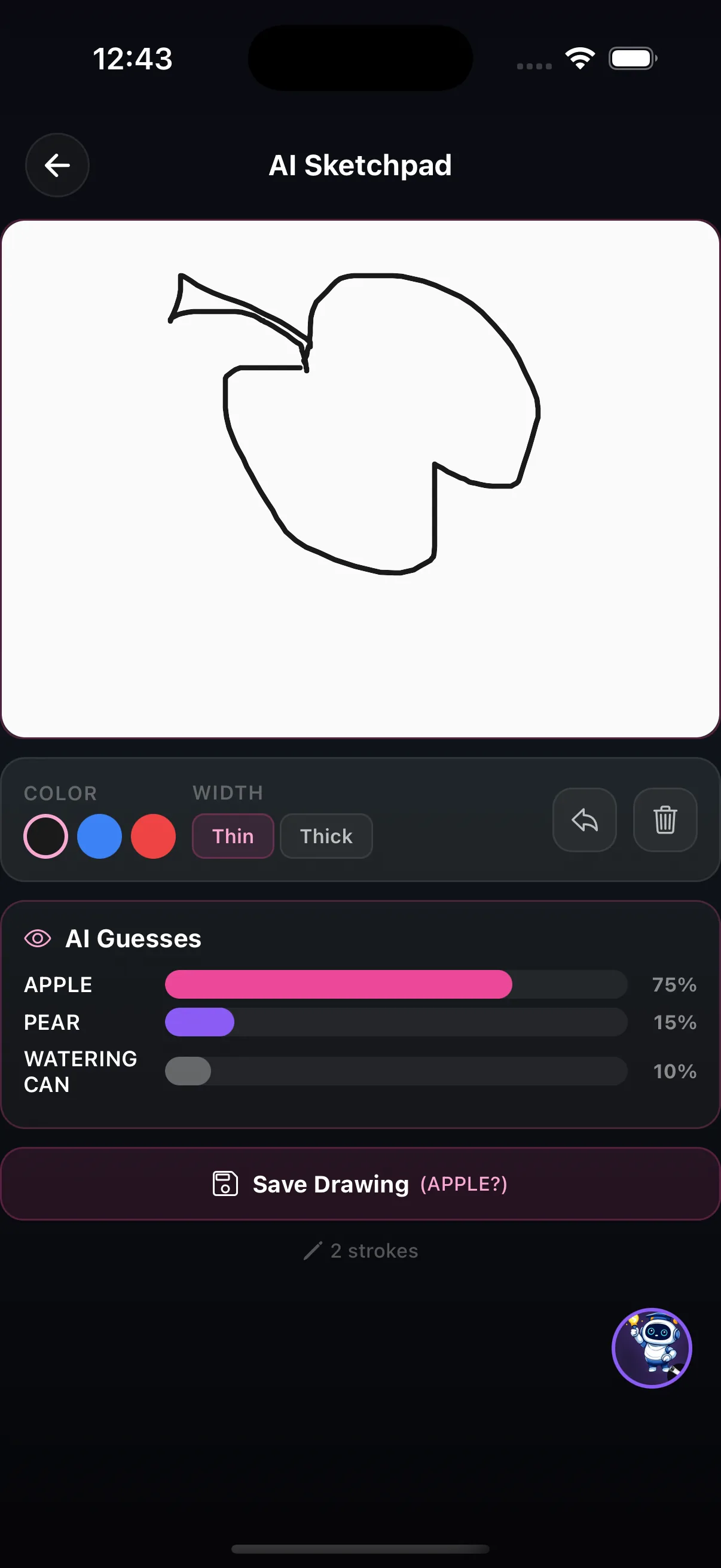
Draw on the canvas and watch an image-recognition model guess what it is — with live confidence scores.
The AI idea behind it
An image classifier does not "see" a drawing the way a person does. It turns the pixels into numbers and outputs a score for every label it knows. The highest score is its guess.
Those scores are confidence, not certainty. A model can be 75% sure of the wrong answer, and a few extra strokes can change its mind completely.
How it works in the app
- Draw on the canvas, choosing a colour and a thin or thick pen; undo or clear as you go.
- The AI Guesses panel shows the model's top answers with a confidence score for each (for example apple 75%, pear 15%, watering can 10%).
- Save the drawing when you are done.
Try this
Change its mind
- Draw an apple and note the top guess and its score.
- Remove the stem, then draw the apple from a different angle. Watch how the scores move.
- Find the smallest change that makes the model switch to a different answer.
What it shows: The model reacts to shapes and strokes it has learned to associate with each label, not to the idea of an apple, which is why small changes can fool it.
Where it fits in the curriculum
More Classify tools


Try AI Sketchpad in the app
One of the creation tools in LittleAIMaster for Grades 6-12.